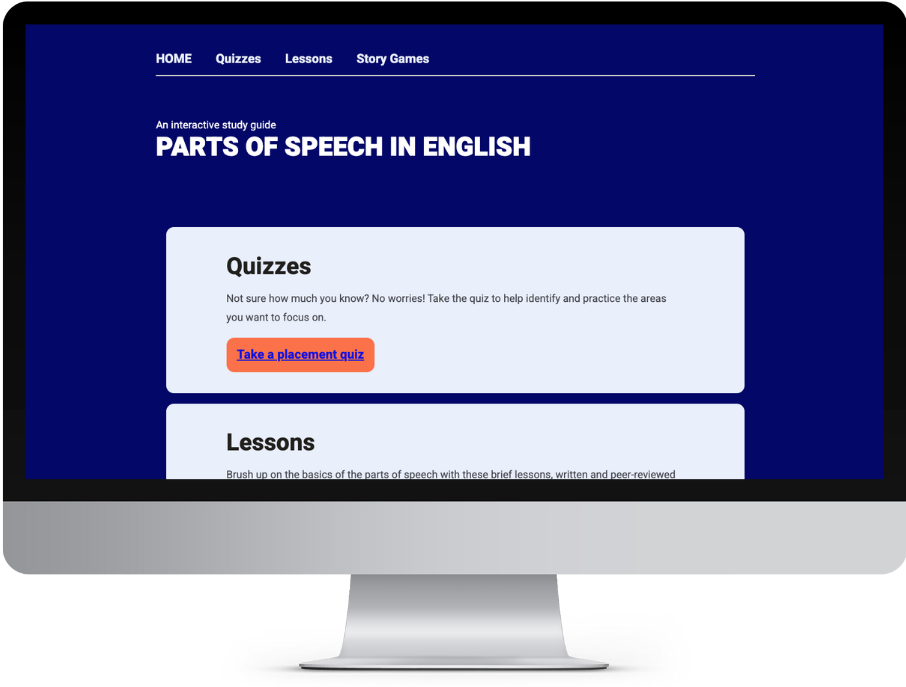
An Interactive Parts of Speech Resource for Tutors
PAPER Education
2023
Part of my role as a Lead Tutor is creating resources to support other tutors. To decide what to focus on, I created a poll on Slack, and focused on the top three items. One of those items tutors wanted to see was a resource to help them better understand the parts of speech.
My goal: to create a fun, engaging resource to help tutors understand, correctly identify, and employ the parts of speech in English.
Together with 13 contributors, I am creating a simple HTML based program which tutors can download to their own device, and which teaches the basics of the eight parts of speech, contains dynamic quizzes to help practice concepts, and some fill-in-the-blank story games to practice using parts of speech in context.
Contents:
My roles:
-
Project management
-
Visual design
-
Information architecture
-
Programming
Design Process

Explore
I assessed the desires and needs of tutors through a simple Slack poll, leveraging the expertise of my colleagues.
As a Lead Tutor, I provide ongoing support to other tutors via Slack. While English tutors are confident supporting students with writing tasks such as essays, there is a definite anxiety around more technical grammar topics, such as sentence diagramming and parts of speech. I included this in a poll among other possible topics for resources.
Out of 10 options, parts of speech ranked fourth.
I produced resources for the top two options: A transfer resource, and a visual resource to help students structure essays.
As another tutor was already covering the topic of working with students on unfamiliar texts, I removed that from my options, leaving the parts of speech as the third option

Next, I further explored the idea through a focus group of full time tutors.
My initial plan was to employ a survey to gather tutors’ feedback and gauge their familiarity with the topic of parts of speech, and I did in fact make it as far as creating said survey. However, as was the case with other projects, this option was eliminated. Surveys are quickly buried in Slack channels, receiving little engagement and reaching only a small portion of the total tutor population, and I do not have clearance to send surveys via email.
Rather than perform guerilla research, as I had with the transfer resource, this time I opted for a focus group. I set up a kickoff meeting to gather ideas from other full time tutors. We met via Google Meet, and went over a FigJam board, generating ideas for content.

The FigJam board used for ideation during the initial focus group.
My initial concept included the story games and explanations of concepts provided through those. The meeting with the tutors revealed some desired features:
-
Tutors wanted quizzes so they could practice concepts
-
Tutors wanted to see a wide variety of topics related to the parts of speech, including sentence types and phrase types
Rather than expand the scope to include a host of new features, I decided to reduce the scope of lessons to focus on “level one concepts”, while also adding in the desired quiz functionality.
Plan
I created a project timeline and organized the work of contributors.
I created a simple Gantt chart in Google Sheets to plan the project, then created a linked sign-up sheet.


The Gantt chart and signup sheets. Click to view full images.
To recruit contributors, I simply shared a link to the sign-up sheet, along with an explanation of the project, in the relevant Slack channel. I had expected a handful of contributors, largely from my own team, but clearly the other tutors were enthusiastic, as I ended up with a total of 13 contributors, and had to expand some of the roles to accommodate so many volunteers.
The project timeline is divided into four sections:
-
Lessons. Tutors research and write brief explanations of their chosen part of speech and the assigned subtopics in a shared Google doc. Each lesson includes practice questions. Peer reviewers then go through the lessons and comment, checking for clarity and accuracy of information.
-
Stories. Tutors write fill-in-the-blank stories using their assigned parts of speech. These are also peer-reviewed, with other tutors checking to be sure the stories function given their constraints.
-
Programming. The finished lessons are added to Twine, and questions and stories are programmed with their required functionality.
-
Quality Assurance. Once the program is complete, QA volunteers check each question, story, and lesson to ensure they have been entered correctly and are functioning as they should.
Architecture
Using Twine, I created a pseudo-database to dynamically populate questions and lesson segments.
The basic architecture for the program was simple enough: Twine works on HTML, CSS, JavaScript, and Harlowe*, therefore the final product would resemble a website. A top navigation would provide persistent links to the various sections, with each section providing links to its own contents via a landing page.
More difficult was determining the architecture for lessons and quiz questions. Lessons are modular. I wanted users to be able to view only the relevant portions of lessons where appropriate. I also wanted questions to be modular, so they could be called dynamically into lessons or quizzes, and randomized so that they truly give users a chance to practice concepts, rather than memorize answers.

Each lesson is broken into parts: each subtopic has its own “passage” in which it is stored. These passages are called into the main lesson page using a (display:) macro.
Each question is also stored in its own passage, and displayed randomly within the appropriate lesson using a combination of (display:) and (either:); the same method is used to build the quizzes.
To keep lessons and questions organized, I devised a coded numbering system, assigning each part of speech a letter, followed by a number indicating the “level” (all 1 at this point), then an underscore, the subtopic number, and finally the question number itself.

I built a program in Twine to populate question code for me and make the process more efficient.
Questions require quite a lot of code to allow them to function as part of both lessons and quizzes. Rather than hand-writing each question, or even copy-pasting the changing variables, I build a small program in a new Twine file to streamline the process. A few questions needed adjustment to function, due to errors caused by quotation marks, but deleting a few quotation marks was nothing compared to my other options.
Visual Design
PAPER's platform and company branding give the resource a coherent look and feel.

The initial Figma designs of the resource.
Since this is being built for PAPER, I used the colours, shapes, and fonts of the PAPER platform and website. I created a style page and built out as many modules as I felt we would likely need, giving me a place to tweak the CSS.
To keep the program light and simple, I avoided using images. Given the user base of highly literate tutors, it was not necessary to decorate the resource too heavily. Differences in font and colour, and a few cards to separate out certain elements, is enough to keep users engaged with the content.


Screenshots of the resource, showing its similarity to the initial Figma designs.
Test
Testing is a core and crucial part of the project plan, and needs to be completed before release.
The resource is still in development, but once it is finished, it will be released to the QA volunteers, who will have a list of items to check.
Post-launch data collection methods are limited, as I do not have access to LMS usage data due to company policy. However, I have several other options open to me:
-
A survey embedded in the resource. This will allow users to submit feedback as they like.
-
Guerilla research via Slack. Perhaps the best measure of resource success will be tutor attitudes and use on Slack. LMS data is flawed, as many resources, like this one, are downloaded and kept on hard drives rather than accessed repeatedly. The most frequent users will not leave data behind to show their use. However, they are likely to speak about and recommend resources to other tutors via Slack, making this the best bet for capturing useful data post-launch.
Reflection
The Good
The concept for this resource proved to be overwhelmingly popular with full time tutors, garnering a far larger volunteer base than expected.
Hurdles
Project planning has been solid, but there are key areas for improvement.
-
Messy communication channels. Tutors tended not to check their emails, which caused some confusion. Without the ability to create a Slack channel, we pivoted to separate Slack DM groups for each "team". This was not an ideal solution, and communication remained flawed.
The fix: Be Loud. Reminding tutors to check their emails may have done a better job of keeping communications clear. Other than this, Slack DMs were the best solution we had available short of moving off of work channels, which I did not want to do.
-
Lack of clarity around project goals. While I made the audience and format of the resource clear in my initial announcement, volunteers overlooked or forgot this information, leading to some issues with direction during lesson reviews.
The fix: Be an ambassador. Another meeting early in the process to once again describe the project and clarify goals and audience would have helped avoid this issue. I can also reiterate goals in regular communications, and provide a centralized document to act as a focal point.
-
Template troubles. Many volunteers had trouble following the lesson templates provided, leading to more variation between lessons than what was desired.
The fix: Be the director. As part of the early meeting, providing a walkthrough of the template may have helped volunteers manage the format of the lessons with a bit more uniformity.
Results
Due to internal restructuring, the time which Full Time Tutors had had to dedicate to projects was drastically cut back during the summer, delaying the completion of this resource and making its fate uncertain.
I have finished coding the resource, and you can explore it here.
Last updated: 22 August, 2023